Creality Ender 3 V3 SE 3D Printer, DIY, CR Touch Auto Leveling, Auto-Load Filament Review (2026)
Updated September 14, 2026 · Research-based review
Our verdict
This DIY Ender 3 V3 SE suits a beginner who wants to learn how their printer goes together, not just how to use it, backed by CR Touch leveling and auto-load filament. The trade-off is an assembly session where a loose bolt or belt can hurt early print quality.
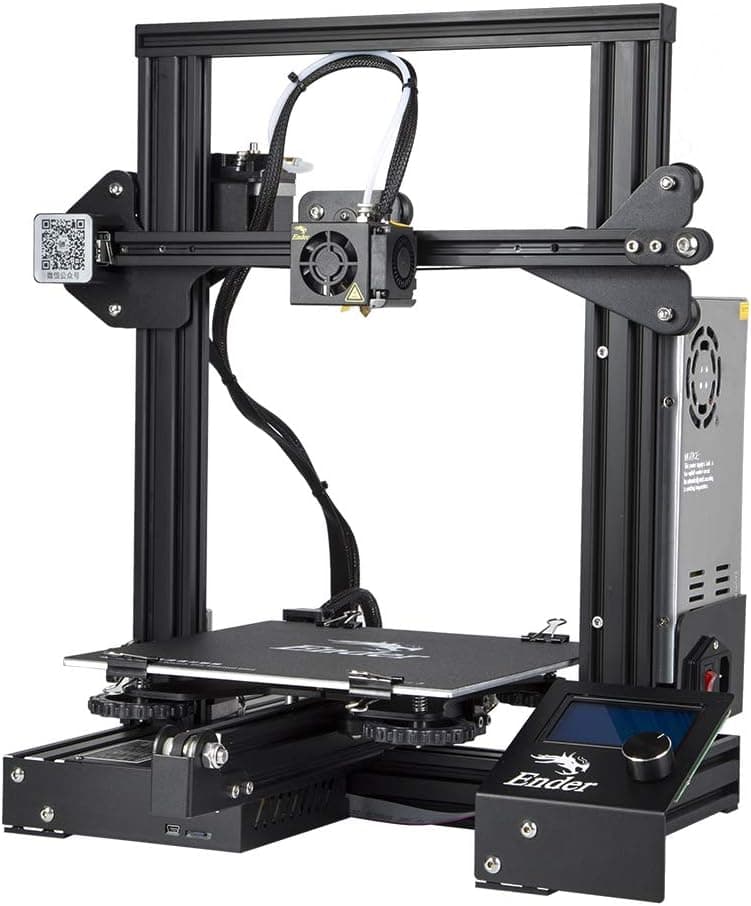
Creality Ender 3 V3 SE DIY kit with CR Touch leveling and auto-load filament, for beginners who like assembling hardware.
Price range: See on Amazon
What we liked
- + DIY assembly teaches how each part works, which helps later repairs
- + Auto-load filament feature makes swapping spools simpler
- + CR Touch auto leveling covers the fiddliest part of first prints
Trade-offs
- - Assembly takes an afternoon and loose bolts can hurt print quality
- - Kit build leaves more room for mistakes than a pre-assembled printer
Who this kit is for
This version of the Ender 3 V3 SE leans into the kit-build side of the hobby, shipping as parts the owner assembles rather than a mostly finished machine. That makes it a good fit for someone who wants to understand how a 3D printer's frame, gantry and extruder fit together before relying on it, since that knowledge pays off later when something needs a belt tightened or a cable reseated. It also suits budget-focused buyers and classroom or workshop settings where the build itself is part of the value, not just an inconvenience. Anyone who wants to open a box and print within minutes should look at the pre-assembled version of this same printer instead, since the appeal here is specifically in doing the build yourself rather than skipping it. Once built, it behaves like any other Ender 3 V3 SE, so the buying decision mostly comes down to how much someone wants that assembly experience.
What you get once it is built
The finished specs match the standard Ender 3 V3 SE: a 220 x 220 x 250mm build volume, CR Touch auto bed leveling with an auto Z-offset strain sensor, and a Sprite direct drive extruder capable of PLA, PETG and TPU. Creality rates the printer up to 250mm/s, with dual Z-axis lead screws keeping the gantry stable as it climbs on taller prints. A nozzle rated to 260 degrees Celsius and a bed rated to 100 degrees Celsius cover the common beginner filaments, though the open frame is not built for ABS the way an enclosed printer is. The auto-load and auto-unload filament function is a standout convenience here, letting an owner swap spools with a couple of taps instead of manually threading filament through the extruder each time, which matters more once color changes become routine.
The build process itself
Assembly follows a documented sequence: mounting the gantry frame to the base with the included screws, attaching the LCD bracket and connecting its ribbon cable, fitting the spool holder, and routing the extruder and motor cables before checking mains voltage and powering on. Creality's own guide estimates the process at roughly 15 to 30 minutes for someone following the steps carefully, using the included Allen wrenches and a Phillips screwdriver. After the main assembly, a few adjustments matter more than they might seem: tightening bed bolts evenly, setting extruder carriage tension with the included wrench, and tensioning the X and Y belts until they give a consistent low pitch when plucked. These small steps directly affect early print quality, so it is worth taking the extra few minutes to get them right rather than rushing to the first print.
The honest trade-off of building it yourself
The main downside of a kit build is that mistakes during assembly show up as print quality problems later, a loose bolt, an uneven belt or a slightly misaligned gantry can all cause ringing, layer shifts or poor first layers that are harder to diagnose than they would be on a machine that arrived correctly tensioned from the factory. A kit build simply leaves more room for user error than a pre-assembled printer does, even though the parts and specs are otherwise identical. Against the pre-assembled Ender 3 V3 SE with CR Touch and the Sprite extruder, which scores slightly higher here, this DIY version is the pick specifically for buyers who want the build experience or a slightly lower price, not for anyone who wants the best odds of a correct first print with no assembly risk. Against the Flashforge Adventurer 5M, a faster and higher-scoring beginner pick, this kit is the more build-it-yourself, budget-conscious option.
Verdict on who should buy the kit version
With our score of 7.8 out of 10, this DIY Ender 3 V3 SE earns solid marks for value and overall fit for a first printer, while landing slightly lower on features and build quality than the pre-assembled version of the same machine, reflecting the extra variability a self-assembled frame introduces. It is worth choosing if the process of building your printer appeals to you, if budget is the deciding factor, or if you are buying for a classroom or workshop setting where the assembly itself is educational. If you would rather skip straight to printing and minimize the risk of assembly mistakes affecting your first prints, the pre-assembled Ender 3 V3 SE or the Flashforge Adventurer 5M are the more direct paths to a smooth first experience.
Frequently asked questions
How long does this DIY Ender 3 V3 SE take to assemble?
Creality's own assembly guide estimates roughly 15 to 30 minutes for the main build, using the included Allen wrenches and a Phillips screwdriver, followed by a few tensioning adjustments.
Does assembling it myself affect print quality?
It can. Loose bolts or unevenly tensioned belts from assembly are a more common source of print issues on a kit build than on a pre-assembled machine with the same specs.
What does auto-load filament mean on this printer?
Tapping an extrude or retract button on the screen feeds or pulls back filament automatically, so changing spools does not require manually threading filament by hand.
Is this the same printer as the pre-assembled Ender 3 V3 SE?
Once built, it shares the same build volume, CR Touch leveling and Sprite extruder. The difference is that this version arrives as a kit rather than mostly assembled.
Prices change often, so check the current price and availability on Amazon.
Check price on AmazonFilament Print Lab may earn a commission from the link above.